

this is a practical guide to the best ai tools for product managers in 2026: a working stack you can actually run your week on. it covers tools for cross-functional teams with concrete examples of how a pm would use each. i first published this in december 2025, and half a year is a long time in ai, so this is a proper refresh. the model layer moved (opus 4.8, sonnet 5, and fable 5 are the current claude lineup), coding and design both got dedicated first-party agents, and two whole categories — living documentation and document intelligence — became things a pm actually has to care about.
who this guide is for
product managers and product leaders in 2026 who want fewer tools and more clarity.
startup product managers trying to pick the right ai stack for research, roadmaps, analytics, and growth.
execs and product-minded ctos who need ai tools to align product, engineering, design, and gtm.
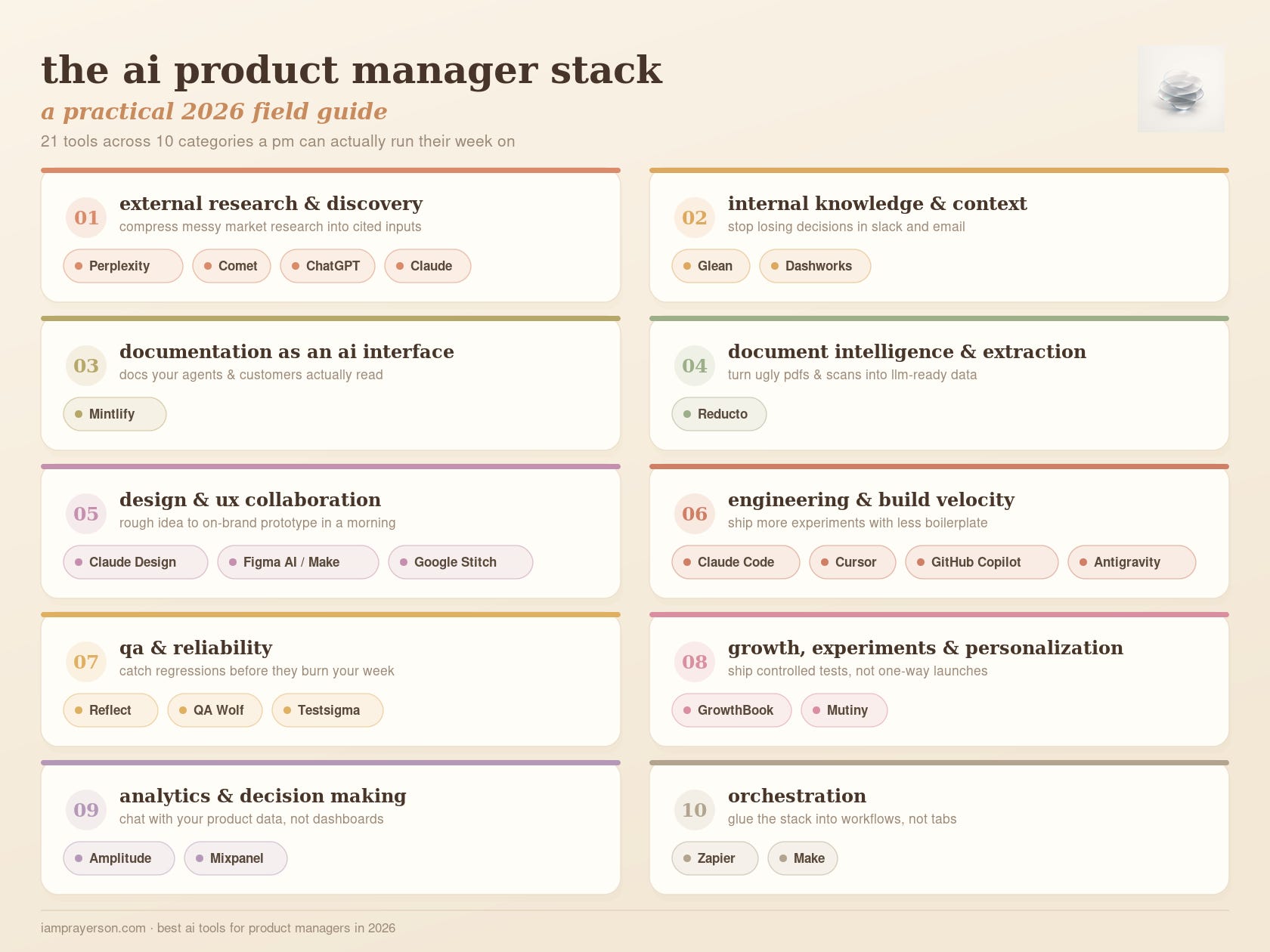
the stack at a glance
perplexity + comet — compress three hours of market research into thirty minutes, now on every platform.
chatgpt / claude with browsing — stress-test strategy with live examples and counter-arguments.
glean — stop losing decisions in slack and email; search and act across your org in natural language.
mintlify — treat docs as the interface your ai agents (and customers) read.
reducto — turn messy pdfs, scans, and spreadsheets into clean, llm-ready data.
claude design + figma make + google stitch — go from a rough idea to a reviewable, on-brand prototype in a morning.
claude code + cursor + copilot + antigravity — help your team ship more experiments with less boilerplate.
agentic qa (reflect, qa wolf, testsigma) — catch regressions without burning cycles on manual qa passes.
growthbook + mutiny — turn launches into experiments and personalised experiences by default.
amplitude + mixpanel — chat with your product data instead of babysitting dashboards.
zapier + make — glue the whole stack together with automations and agents.
which part of your week as a pm feels the most manual right now? keep that in mind as you read; the goal is to replace that pile of busywork first.
how i think about ai tools as a pm
before the list, i want to set the frame. as a pm, your ai stack is not a toy shelf. it is the set of systems that sit behind you when you walk into a roadmap review and someone asks, “how do we know this is worth building?”
the way i think about tools is simple:
can this remove a full category of busywork from my week?
can this give me a clearer, faster decision?
can this turn one pm into what used to feel like a small team?
with that lens, here is how i break the stack in 2026:
external research and market discovery
internal knowledge and context
documentation as an ai interface
document intelligence and data extraction
design and ux collaboration
engineering and build velocity
qa and reliability
growth, experiments, and personalization
analytics and decision making
orchestration: gluing everything together
two of those categories — documentation and document intelligence — are new since the december 2025 version. in 2026, ai agents are a first-class reader of your docs and your files, and pms who ignore that ship slower.
external research and market discovery
this is where you compress messy market research into clear, cited inputs for your roadmap and bets.
perplexity and comet for deep research
perplexity started as “ai search” but it has become one of the most useful research tools for product work. you ask a question in natural language, it pulls from multiple sources, cites them, and lets you follow up without losing context. the value for a pm is that it holds the thread while you move from market size, to competitor moves, to technical constraints, to recent news.
comet, their ai-powered browser, pushes this further. as of 2026 it is no longer a mac-only curiosity — it shipped to ios, android, and windows, climbed to the top of the app store, and its deep research mode can now generate the deliverable itself: a powerpoint, a spreadsheet, or a dashboard straight from your prompt. the comet assistant also remembers your preferences when it drives the browser for you.
for a pm, that closes the loop. you skim ten tabs on a new competitor, comet summarises them, spots patterns, and hands you a draft deck you can react to — instead of a pile of half-read links. the citation layer still matters when you are writing a strategy doc and need to show where a claim came from rather than hand-waving through a deck.
chatgpt or claude with browsing for structured exploration
a general-purpose assistant with browsing sits next to perplexity nicely. i treat chatgpt or claude as a thinking partner rather than a search engine. where perplexity is great at “what is happening and who said what,” a reasoning model with browsing is great at “help me reason through this and pull in specifics when needed.”
a typical flow: i use perplexity to gather the landscape, then switch to a chat model to stress-test a strategy. “given these competitors, these constraints, and this user behaviour, outline three approaches, then pull concrete examples of similar patterns from the web.” that blend of reasoning plus fresh context is something pure search cannot do well, and it is where a lot of the real pm work — synthesis — actually happens.
internal knowledge and context
this is your intelligent internal layer so decisions and context stop getting lost in slack and email.
glean as your company-wide memory (and now, coworker)
glean is the clearest example of what an internal knowledge copilot should feel like. it connects to your internal tools, understands documents, tickets, chats, and dashboards, and lets you ask questions in natural language while respecting permissions. instead of “where is that spec from last year,” you ask “show me the last three proposals we made to change onboarding, and highlight the objections from sales.”
in 2026 glean stopped being just search. its third-generation assistant is pitched as an ai coworker: it runs enterprise actions across 100+ connected apps (salesforce, jira, github, asana, canva), spins up agent sandboxes with a code interpreter for long-running analysis, and offers proactive agent templates that surface action items and plan your day. for a pm that means you can walk into a meeting already knowing what has been tried, where experiments failed, and which team solved half your problem in another product line — and then actually kick off the follow-up without leaving the tool.
the platform also has a deep research mode that plans and executes across web and internal data and returns a structured, cited report — close to what you want when writing a big brief that touches multiple systems and historical decisions. (if you want something lighter-weight, dashworks still does quick “who owns this / what did legal say” answers inside slack, but glean has expanded enough that most teams no longer need both.)
documentation as an ai interface
your docs are no longer just for humans; they are the interface your ai agents and your customers’ agents read first.
mintlify for docs that agents can use
this is a category i did not include in december, and it now feels obvious. mintlify is an ai-native documentation platform, and the shift in 2026 is that documentation became a machine interface, not just a human one. by mintlify’s own march-2026 data, ai coding agents account for nearly half of all documentation traffic — with claude code and cursor driving most of it.
two things make it relevant to a pm. first, the mintlify agent watches your codebase and opens pull requests to update the docs whenever you ship a change — and it lives in slack, so anyone on the team can maintain docs by chatting with it. that quietly kills the “our docs are always six weeks behind the product” problem. second, every mintlify site auto-generates llms.txt, llms-full.txt, skill.md files, and an mcp server, so your product is legible to ai agents natively rather than as scraped html.
why a pm should care: your docs are increasingly the first surface an evaluator (human or agent) touches. if a prospect’s ai assistant can read your docs cleanly and answer “can it do x,” you win consideration you never see in analytics. treating docs as a maintained, agent-readable product surface is now a growth lever, not a chore you delegate.
document intelligence and data extraction
this is how you turn the messy pdfs, scans, and spreadsheets your product depends on into clean, structured, llm-ready data.
reducto for agentic document parsing
if any part of your product ingests documents like contracts, invoices, statements, forms, medical or financial records, reducto is worth knowing. it combines computer vision with vision-language models to produce layout-aware output across 30+ formats, and its agentic ocr layer runs multi-pass review to catch and correct last-mile parsing errors that break naive extraction pipelines.
the 2026 headline is deep extract, which ranked first overall on the independent longextractbench with roughly 99.6% precision and recall and zero failures on complex documents. the company raised a $75m series b led by a16z, is now on the aws marketplace, added a lightweight classification endpoint, and counts harvey, vanta, and scale among named customers.
why a pm should care: “get structured data out of ugly documents” is one of those problems that eats an entire quarter if you try to build it yourself. reaching for a specialist like reducto turns a months-long extraction project into an api call, which changes what you can credibly put on a roadmap. if your product’s value depends on reading documents accurately, the extraction layer is a build-vs-buy decision you should make on purpose.
design and ux collaboration
these tools help you move from a fuzzy idea to concrete, on-brand prototypes people can react to — without a designer in the room for round one.
claude design as your first design collaborator
the biggest gap in the december version was that i never mentioned claude design, because it did not exist yet. anthropic labs launched it in april 2026, and it is built almost exactly for the pm-who-can’t-design. you describe what you want — a prototype, a slide, a one-pager, an onboarding flow — and claude generates a first version you refine with direct edits or plain-language requests.
the standout capability, and the reason it reads as a figma challenger, is that it can read your team’s codebase and design files and apply your actual design system to everything it makes, so the output looks like your product instead of generic ai slop. you can export decks and prototypes as pdf, a shareable url, pptx, or push them into canva for a designer to polish.
for a pm this is a genuine rhythm change. you can walk into an early review with a tangible, on-brand artifact instead of a wall of bullets, and the design conversation starts from judgment and craft rather than “let me explain what i mean.” it is in research preview on claude pro, max, team, and enterprise.
figma ai and figma make for real design structure
figma ai still earns its place. inside figjam and design files it can generate flows from text prompts, turn whiteboard scribbles into clean diagrams, summarise a long design-review thread before you propose changes, and rewrite copy to fit tone or length. the more important move for your stack is figma make and figma’s mcp server, which expose real design structure to ai agents rather than screenshots. that opens the door to automated checks, smarter handoffs, and agent-assisted prototyping — your ai tools can talk to the actual design, not a picture of it.
google stitch for fast ui exploration
stitch (the evolution of galileo ai after google acquired it) takes a text prompt and returns a functional layout — a pricing screen, an onboarding flow, a dashboard. in 2026 it streams its work to the canvas in real time so you can steer the stitch agent mid-generation, then export screens into google antigravity to wire up backend logic or publish straight to the web via netlify. worth a caveat: it is still largely html/css output with no real-time collaboration, so treat it as a fast starting point for structure and intent, not a finished design system.
engineering and build velocity
this is about shipping experiments faster without turning you into a full-time engineer.
claude code as the default agentic coding environment
the other tool i have to add: claude code. it moved from “interesting cli” to the coding tool a lot of teams now build around. as of mid-2026 it defaults to claude sonnet 5 with a 1m-token context window, supports nested sub-agents for layered task decomposition, and its managed agents can run on cron schedules for recurring work. it can also capture a session as a live, shareable artifact — a pr walkthrough, a system explainer, a dashboard — which is unusually useful for a pm who wants to understand a change without reading a diff.
for a pm the value is partly indirect — your team ships more experiments and burns less time on scaffolding — and partly direct. you can point claude code at the repo and ask it to explain how a feature works, where a config lives, or what a service does before you propose a change, then have it turn the answer into an artifact you can share in the roadmap review. the coding leader in your stack is now claude opus 4.8 / sonnet 5 under the hood, and that is worth saying out loud.
cursor, copilot, and antigravity for the rest of the stack
cursor kept moving fast: cursor 2.0 introduced its own composer model, and by mid-2026 composer 2.5 performs on par with opus 4.7 and gpt-5.5 on coding benchmarks at a fraction of the cost, inside an increasingly agent-first interface. paired with github copilot and google’s antigravity agent-first editor, the default engineering setup is now “human engineer plus ai pair (plus a few background agents).” that shifts scope: small teams can take on more ambitious work because the repetitive parts of the build are handled by the stack, not by junior engineers burning evenings on boilerplate.
qa and reliability
this is where you catch regressions and risky changes before they burn your week.
from recorded tests to agentic qa
qa is usually ignored in tool lists, which is funny, because it is where a lot of launch anxiety lives. reflect (now part of smartbear) still does the core job well: you record flows in a real browser, it turns them into maintainable tests, and ai helps stabilise selectors so tests don’t break every time someone nudges a button five pixels. the honest 2026 update is that the category moved past record-and-replay. reflect and similar tools don’t fully self-heal when the ui changes, and a newer wave of agentic qa platforms — qa wolf, testsigma’s atto, endtest — describe test goals in natural language and let agents create, run, maintain, and triage across the whole qa lifecycle.
for a pm the emotional shift matters more than the vendor choice. instead of asking “can we afford regression this cycle,” you bake continuous coverage into the normal rhythm and free your qa specialist for edge cases, accessibility, and performance. the clearest trend of the year: the teams moving fastest stopped maintaining scripts and started describing goals. combine that with ai-assisted unit and integration tests from your engineering stack and the main constraint on velocity becomes product clarity, not test overhead — exactly where a pm wants to be.
growth, experiments, and personalization
this is your feature-flags and experimentation layer so you can ship controlled tests instead of one-way launches.
growthbook for flags and experiments
growthbook is an open-source platform for feature flags and experimentation. it lets you roll out features gradually, target segments, and run a/b tests with serious statistical machinery — sequential testing and cuped baked in. once you have a good experimentation layer, your ai stack can help design variants, predict likely winners, and summarise results in words stakeholders understand, while growthbook holds the experiment logic and safeguards. instead of “we shipped this and watched a dashboard,” every feature ships behind a flag and experiments run by default.
mutiny for website personalization
mutiny focuses on b2b website personalization: targeted experiences per account segment, copy and components adjusted through a visual editor, and ai to generate or refine messaging. for a pm working a growth surface — pricing pages, onboarding, product tours — it turns the website into a continuously evolving experiment rather than a static brochure. in 2026 the pattern is that ai writes and tests the copy variants while mutiny handles routing and measurement; your job becomes deciding which hypotheses matter and how aggressive to be with segmentation.
analytics and decision making
this is where your analytics become an ai layer you can interrogate in natural language — and increasingly, one that pings you first.
amplitude for agentic, conversational analytics
amplitude kept investing in its ai interface: you type “show me week-over-week retention for users who tried feature x in their first three sessions” and it builds the query and returns a chart plus explanation. the 2026 step change is agentic — amplitude shipped agentic ai analytics and an in-product ai assistant that finds risk cohorts, proposes experiments, and even tracks cost and latency for teams shipping ai features. it also integrates with the rest of the modern stack: cursor, claude code, figma make, and more. for a pm who isn’t a sql or event-taxonomy expert, this makes real exploratory analysis possible in the middle of a meeting.
mixpanel for chatting with your product
mixpanel repositioned as an ai-first analytics suite — product analytics, web analytics, session replay, experimentation, and feature flags in one place, with an ai layer (signals) that monitors your metrics continuously and surfaces what changed before anyone thinks to check. mixpanel headless even gives ai coding agents direct programmatic access to your funnels, cohorts, and dashboards. the pm benefit is speed from question to insight: you go from “adoption feels low” to “what does adoption look like by country, device, and channel” in one conversation. taken together, amplitude and mixpanel show the bigger shift — analytics tools are becoming conversational partners inside your stack, and sometimes the ones raising their hand first.
orchestration: where everything comes together
this is the glue that turns tools into workflows instead of more browser tabs.
zapier and make as the connective tissue
once you have research tools, design helpers, build accelerators, qa agents, growth platforms, and analytics assistants, the missing piece is orchestration. a lot of product work is glue: “when this metric drops, create a ticket,” “when an experiment crosses significance, post it in slack,” “when a user finishes onboarding, trigger a personalised walkthrough.” zapier has repositioned as an ai orchestration platform — thousands of app connections plus ai-native features like a workflow copilot and mcp integrations that let agents call actions across your stack.
make sits in a similar space but leans into visual, real-time automation for ai and agents: drag-and-drop workflows that mix normal apis with model calls, multi-step automations, and every run visible on a canvas. for a pm, these tools are the difference between “powerful systems that live in silos” and “a coherent ai-powered product team that talks to itself.” you automate the boring loops, keep humans in the high-judgment moments, and let agents trigger other agents without you playing traffic cop.
how to choose your stack in 2026
start from workflows, not tools: list the 3–5 product workflows that hurt the most and map tools to those.
prefer tools that make decisions explainable: if it can’t show you why it recommended a change, it won’t survive exec review.
avoid tool sprawl: pick one default per category and make it the “front door” for that workflow across the team.
prefer first-party agents where they now lead: in 2026 that increasingly means claude code for building and claude design for early design, because they read your real codebase and design system.
run 30–60 day trials: treat each tool as an experiment with a clear success metric — fewer meetings, faster decisions, fewer bugs, better retention.
questions product managers ask about ai tools in 2026
how do i avoid a bloated ai tool stack nobody uses?
treat every tool as an experiment with a clear success metric (hours saved, experiments shipped, tickets avoided), run a 30–60 day trial, and keep only what changes real behaviour in your calendar and roadmap — not what looks impressive on a slide.
are free ai tools enough, or do you need paid plans?
free tiers are fine to learn workflows, but serious pm work usually needs paid plans for privacy, api access, and team features. the key is a small, integrated paid stack rather than five disconnected free tools.
is claude design ready to replace figma?
not as a wholesale replacement — it launched in research preview in april 2026 and shines at getting an on-brand first draft fast. the realistic pattern is claude design (or stitch) for round one, then export to figma or canva for a designer to refine. it changes who starts the design, not who finishes it.
how should product teams roll out new ai tools without breaking workflows?
start with one or two high-impact workflows (research or analytics), run the new tool in parallel with your existing process for 30–60 days, and define a clear cutover moment once you have evidence it is faster and safer. avoid rolling out five tools at once across the whole org.
closing reflection: your stack is the team
this is the biggest takeaway for me, and it only got truer in 2026. the best ai tools for product managers are not exciting because they exist. they are exciting because they let one pm operate like a small, well-coordinated team.
research agents compress weeks of tab-hunting into an afternoon. internal copilots keep the entire history of your org within reach, and now act on it. living documentation and document-intelligence layers make your product legible to both agents and customers. design and coding both got first-party agents that read your real codebase. qa and analytics stopped waiting to be asked. orchestration keeps the whole thing running without you pushing every button.
if you pick tools carefully and wire them into your daily work, your ai stack becomes your new product team — not a replacement for the humans, but a force multiplier that removes the low-leverage parts of the job so you can spend more time on judgment, storytelling, and system design. the pm who treats these as a serious stack will feel their leverage grow every quarter. the pm who treats them as a wall of logos for a slide will feel the gap widen and wonder when the job started to move away from them.
if you want to sanity-check your own stack, tell me: which part of your week as a pm feels the most manual right now?